- Printers
-
Photobooth
-
Photobooth
-
Photobooth Accessories
-
Photobooth Bundles
-
Introducing
Custom Frames
Explore How
-
- Photo Paper
- Bundles
- Accessories
- Support
- Printers
-
Photobooth
-
Photobooth
-
Photobooth Accessories
-
Photobooth Bundles
-
Introducing
Custom Frames
Explore How
-
- Photo Paper
- Bundles
- Accessories
- Support
Soporte al cliente de HP: base de conocimientos
HP Sprocket 200 Printers - Which Photo Paper Can I Use with My Sprocket?
This document is for HP Sprocket printers.
Read the section below that matches your Sprocket for compatible photo paper and HP Print Quality Card (formerly Smartsheet).
HP Sprocket 2-in-1s
The HP Sprocket 2-in-1 supports 5.0 x 7.6 cm (2 x 3 in) HP Sprocket Photo Paper with the blue card.
|
HP Sprocket Photo Paper logo
|
Example of the blue card
|
|
|
HP Sprocket 200 Printers
The HP Sprocket 200 Printer supports 5.0 x 7.6 cm (2 x 3 in) HP Sprocket Photo Paper with the blue card.
|
HP Sprocket Photo Paper logo
|
Example of the blue card
|
|
|
HP Sprocket Photo Printers
The HP Sprocket Photo Printer supports 5.0 x 7.6 cm (2 x 3 in) HP Sprocket Photo Paper with the blue card.
|
HP Sprocket Photo Paper logo
|
Example of the blue card
|
|
|
HP Sprocket Plus Printers
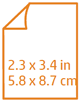
The HP Sprocket Plus Printer supports 5.8 x 8.7 cm (2.3 x 3.4 in) HP Sprocket Plus Photo Paper with the orange card.
|
HP Sprocket Photo Paper logo
|
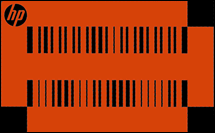
Example of the orange card
|
|
|
HP Sprocket Select Photo Printers
The HP Sprocket Select Photo Printer supports HP Sprocket 5.8 x 8.7 cm (2.3 x 3.4 in) Photo Paper with the orange card.
|
HP Sprocket Photo Paper logo
|
Example of the orange card
|
|
|
Por favor, ayúdenos a mejorar proporcionando comentarios sobre su experiencia con este documento.
Ejemplos: “LaserJet Pro P1102 atasco de papel”, “EliteBook 8440p bios”